
FibreGeeks leads the charge with affordable, uncapped fibre internet for families starting from R465/month and strong ISP support via LunaFibre. RSAWEB, Atomic Access, and other Cape-focused providers offer solid alternatives depending on your suburb, estate, and fibre network. When choosing a provider, always weigh speed, price, data caps, and contract terms against your household’s needs. And yes—by 2026, your internet connection is no longer “nice to have”. It’s a household utility.
2026 note: pricing and promotions can change (sometimes without much warning). Where we’ve listed example prices below, treat them as a guide and confirm the latest price at checkout for your specific address and fibre network.
The Best Fibre Internet Options for Cape Town Families in 2026
If your household is juggling Google Classroom, Zoom/Teams calls, streaming, gaming and the usual “everyone is online at once” reality, fibre is still the most consistent option for speed and stability—especially in estates and gated communities where fibre infrastructure is properly maintained.
1. Overview of Home Internet Needs for Schooling and Work
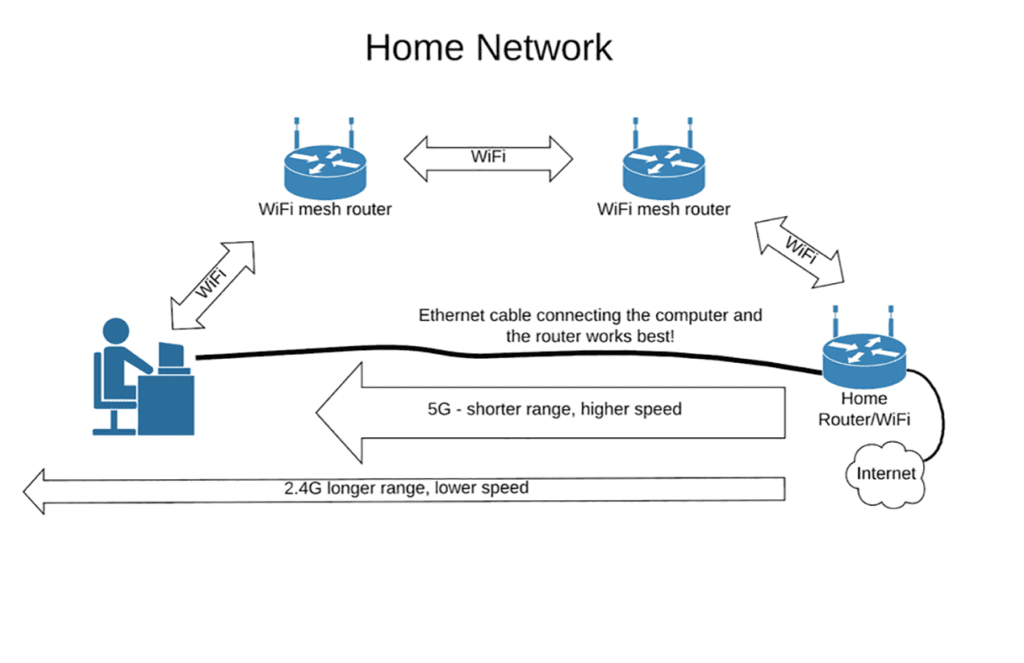 Credits: internet2.edu
As remote learning and working from home have become the norm for many families, the demand for reliable fibre internet has climbed sharply. Households now need connections that support multiple users at once for online classes, video conferencing, large downloads, and cloud-based work. Internet speed plays a big role in these activities; slow connections cause frustrating interruptions during assessments, meetings, and collaborative projects. A stable connection is also key for interactive learning environments that require real-time participation.
For many households, being able to stream educational content or access work applications without hiccups is a priority. This extends to data allowances as well; families should lean toward uncapped packages to avoid slow-downs when balancing the needs of students and remote workers. Budget is always part of the decision, so the best option is usually the plan that gives a real-world balance between price, performance, and support.
When comparing options, it’s worth understanding the difference between fibre, LTE, and ADSL. Fibre is generally the best for high speed and consistent reliability. LTE can work where fibre coverage is limited, but performance depends heavily on signal quality and tower congestion. ADSL is typically the most budget-friendly, but it’s increasingly outdated for modern household demands. Also factor in installation/equipment costs and the quality of support—because issues don’t ask permission before happening.
Lastly, in South Africa, don’t ignore load shedding / power interruptions when planning home connectivity. A small UPS for your router and ONT can be the difference between “still online” and “dead silence” during school or meetings.
2. Top Choice: FibreGeeks for High-Speed Internet
 Credits: fibregeeks.co.za
FibreGeeks remains a top choice for high-speed fibre internet for families, especially in gated communities and estates. As a Fibre Network Operator (FNO), FibreGeeks focuses on building and maintaining infrastructure where speed, stability, and support matter. With uncapped packages typically ranging from 20 Mbps to 500 Mbps, FibreGeeks is built for homes balancing school, work, and entertainment.
Through ISP partners like LunaFibre, customers can get a smooth onboarding experience with free installation, transparent pricing, and no “surprise fees” halfway through the process. If you want to check availability and see which ISPs serve your estate, use FibreGeeks’ Get Fibre tool.
2026 performance tip: for streaming and gaming, peering matters. ISPs that maintain direct routes to major platforms can reduce buffering and improve latency. If you’re a heavy streaming household, this is one of those “invisible differences” you’ll feel immediately.
Not sure which ISP to choose on the FibreGeeks network? This guide helps you compare options: Which ISP Should I Choose on the FibreGeeks Network?
3. RSAWEB: Cape Town-Based Connectivity with Personalised Support
RSAWEB is a Cape Town-born ISP with fibre packages designed for local households. Fast activation (where the FNO allows it) and responsive support make RSAWEB a strong option for families looking for a more personal experience. Pricing varies by fibre network, but RSAWEB does offer entry-level uncapped options (for example, a 25/10 uncapped package listed at R442/month on select networks).
If you want commitment-free flexibility, RSAWEB’s month-to-month options can be a good fit—especially for households that may upgrade/downgrade based on changing needs through the year.
4. Atomic Access: Affordable and Transparent Internet for the Western Cape
Atomic Access is a Cape Town-based ISP known for straightforward fibre packages and a strong focus on network quality. They offer uncapped, unshaped packages across multiple fibre networks in the Western Cape. As an example, Atomic lists an Openserve 50/25 package at R799/m (inc VAT). Availability and pricing depend on the fibre network in your area.
Atomic is a good option for families who want fast fibre with minimal fuss—just make sure you confirm the package is on the correct network for your address.
5. Additional Providers Worth Considering
Cool Ideas – Popular ISP with a strong following and a month-to-month approach. Their pricing and speeds are often structured around higher, symmetrical packages (e.g. 120/120) depending on network.
Herotel – Growing footprint across the Cape with fibre and wireless options in areas where fibre coverage is patchy.
Home-Connect – Offers a wide range of fibre network options with month-to-month service; pricing varies heavily by network and promotions.
Always check availability in your area and don’t be afraid to compare provider tools or contact them directly. Local support and local network knowledge can be a real advantage in the Western Cape.
6. Choosing the Right Internet Package
Selecting the right package starts with knowing how your household uses the internet. If your family streams in HD/4K, plays online games, and joins Zoom calls at the same time, you’ll typically want 50 Mbps or higher (and possibly more if you’ve got multiple 4K streams running).
Evaluate:
- Speed needs for multiple users
- Whether you prefer month-to-month or contract pricing
- Uncapped vs capped data plans
- Router and installation inclusions
- Wi-Fi coverage (bigger homes often need a mesh setup)
- Backup power for your router/ONT during outages
Here’s a helpful breakdown (example pricing as of 2026 — confirm at checkout for your address):
| Provider | Package Speed | Monthly Cost | Data Limit | Contract Flexibility |
|---|---|---|---|---|
| FibreGeeks (via LunaFibre) | 20/10 Mbps | R465 | Uncapped | Varies by ISP (often month-to-month) |
| FibreGeeks (via LunaFibre) | 50/25 Mbps | R725 | Uncapped | Varies by ISP (often month-to-month) |
| FibreGeeks (via LunaFibre) | 100/50 Mbps | R965 | Uncapped | Varies by ISP (often month-to-month) |
| FibreGeeks (via LunaFibre) | 200/50 Mbps | R1,045 | Uncapped | Varies by ISP (often month-to-month) |
| FibreGeeks (via LunaFibre) | 500/250 Mbps | R1,350 | Uncapped | Varies by ISP (often month-to-month) |
| RSAWEB | 25/10 Mbps | R442 | Uncapped | Month-to-month (network dependent) |
| Atomic Access | 50/25 Mbps | R799 (inc VAT) | Uncapped | Month-to-month (network dependent) |
| Cool Ideas | 120/120 Mbps (example) | R849 (example) | Uncapped | Month-to-month |
| Home-Connect | 50/50 Mbps (example) | R748 (example) | Uncapped | Month-to-month |
Quick FNO reality check: if you’re on an open-access network, the fibre line (FNO) and the service/support (ISP) are not always the same company. In most cases, your ISP is your first point of contact for billing and support, and they’ll escalate to the FNO if a line fault is identified. If you want to get connected on FibreGeeks, start here: Get Fibre.
7. The Importance of Reliable Internet for Learning and Streaming
Internet is no longer a luxury—it’s a necessity for modern education and work. Online classes need bandwidth, streaming needs consistency, and remote work platforms need stable, real-time connectivity.
During school hours, even a single drop in service can derail assignments and assessments. The same goes for remote professionals in meetings or syncing cloud files. That’s why fibre remains the best “set-and-forget” option for most families (coverage permitting).
Choosing the right ISP and a reliable network can mean the difference between daily disruptions and a home that simply works. Don’t settle. Your connection is your family’s gateway to education, opportunity, and entertainment.
Frequently Asked Questions
1. What speed do I need for online learning and remote work? At least 25 Mbps for smooth video calls and online learning — more if multiple devices are used.
2. How much data do I need for streaming? For HD streaming: ~3 Mbps. For 4K, ~25 Mbps. If your household streams often, choose an uncapped package to avoid slow-downs.
3. Is fibre better than LTE or ADSL? Yes. Fibre is faster and more reliable for multi-user households. LTE is flexible but signal-dependent. ADSL is increasingly outdated for modern needs.
4. Can multiple people use the internet at the same time? Yes, as long as your bandwidth can support it. A package of 50 Mbps or higher is a safer baseline for simultaneous usage.
5. What’s the difference between upload and download speed? Download = content to you (e.g. Netflix), Upload = content from you (e.g. Zoom calls). For remote work and cloud backups, both matter.
6. Will fibre work during load shedding? The fibre line can still be live, but your router and ONT need power. A small UPS can keep you online during short outages.
Ready to check coverage? Start here: Get Fibre or contact the team via Contact.